Web API Samples
This guide focuses on familiarity with Web Audio API patterns.
The method names and graph model are intentionally web-like, so patterns from browser audio code transfer with minimal changes.
Visual and listening preview
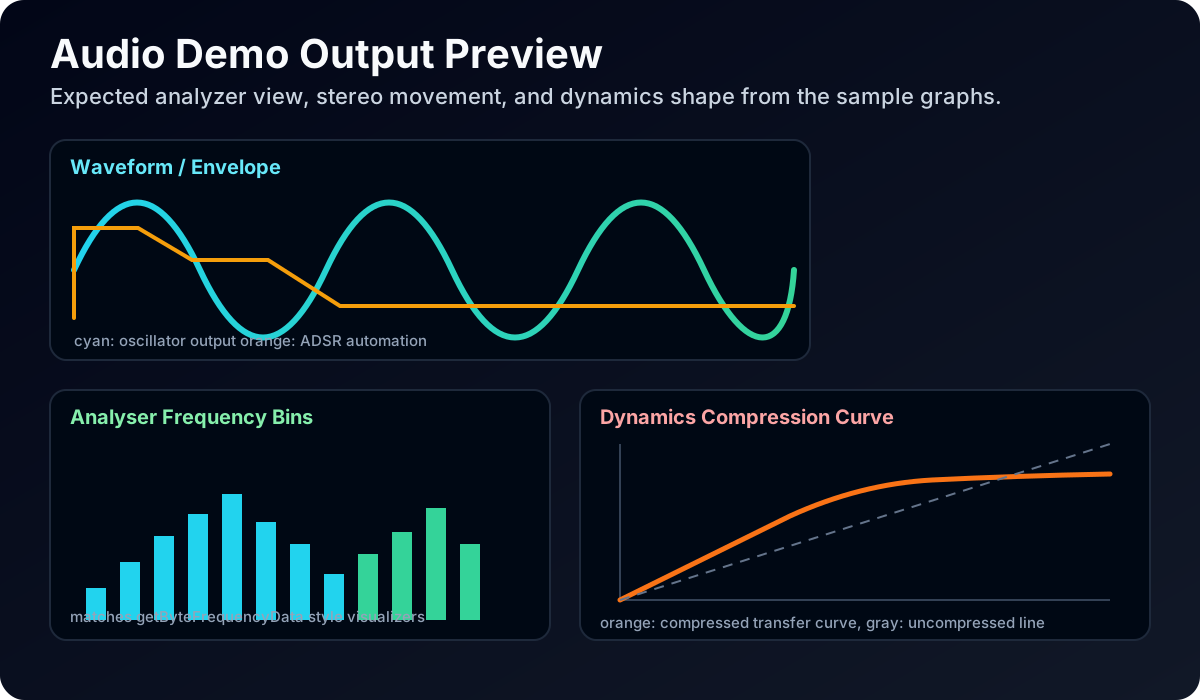
What to expect while running these samples:
- Oscillator and envelope examples produce clean pitch with clear attack and release shape changes.
- Analyser examples show stable frequency peaks that move as source frequency and filtering change.
- Compression and saturation examples should sound tighter and denser than dry signal routing.
- Panner examples should clearly move across the stereo field as automation runs.
Interactive browser UI preview
This panel runs browser Web Audio graphs that mirror the guide samples so developers can hear expected behavior quickly.
Demo is hidden by default. Click View demo to open controls.
Use this panel to hear and inspect common graph behavior before wiring the equivalent NativeScript code. Click View demo in the panel header to open all 11 sample controls. The panel now also includes on-screen instruments with a plucked string mode and an original groove.
1. Basic oscillator graph
import { AudioContext } from '@nativescript/audio-context';

const ctx = new AudioContext();
await ctx.resume();

const osc = ctx.createOscillator({ type: 'sine', frequency: 440 });
const gain = ctx.createGain({ gain: 0.1 });

osc.connect(gain);
gain.connect(ctx.destination);

osc.start();
setTimeout(() => osc.stop(), 1000);
2. ADSR-style envelope with AudioParam automation
import { AudioContext } from '@nativescript/audio-context';

const ctx = new AudioContext();
await ctx.resume();

const now = ctx.currentTime;
const osc = ctx.createOscillator({ type: 'sawtooth', frequency: 220 });
const amp = ctx.createGain({ gain: 0 });

osc.connect(amp);
amp.connect(ctx.destination);

// Attack
amp.gain.setValueAtTime(0.0001, now);
amp.gain.exponentialRampToValueAtTime(0.3, now + 0.02);

// Decay to sustain
amp.gain.exponentialRampToValueAtTime(0.15, now + 0.2);

// Release
amp.gain.setTargetAtTime(0.0001, now + 0.5, 0.08);

osc.start(now);
osc.stop(now + 1.2);
3. Filter sweep
import { AudioContext } from '@nativescript/audio-context';

const ctx = new AudioContext();
await ctx.resume();

const osc = ctx.createOscillator({ type: 'square', frequency: 110 });
const filter = ctx.createBiquadFilter({ type: 'lowpass', frequency: 200, Q: 4 });
const out = ctx.createGain({ gain: 0.12 });

osc.connect(filter);
filter.connect(out);
out.connect(ctx.destination);

const now = ctx.currentTime;
filter.frequency.setValueAtTime(200, now);
filter.frequency.exponentialRampToValueAtTime(6000, now + 2);

osc.start(now);
osc.stop(now + 2.2);
4. Stereo panning automation
import { AudioContext } from '@nativescript/audio-context';

const ctx = new AudioContext();
await ctx.resume();

const osc = ctx.createOscillator({ type: 'triangle', frequency: 330 });
const pan = ctx.createStereoPanner({ pan: -1 });
const gain = ctx.createGain({ gain: 0.1 });

osc.connect(pan);
pan.connect(gain);
gain.connect(ctx.destination);

const now = ctx.currentTime;
pan.pan.setValueAtTime(-1, now);
pan.pan.linearRampToValueAtTime(1, now + 2);

osc.start(now);
osc.stop(now + 2.2);
5. 3D panner
import { AudioContext } from '@nativescript/audio-context';

const ctx = new AudioContext();
await ctx.resume();

const osc = ctx.createOscillator({ type: 'sawtooth', frequency: 180 });
const gain = ctx.createGain({ gain: 0.12 });
const panner = ctx.createPanner({
  panningModel: 'HRTF',
  distanceModel: 'inverse',
  refDistance: 1,
  maxDistance: 24,
  rolloffFactor: 1.2,
});

// Optional cone settings can make front/back differences more obvious.
panner.coneInnerAngle = 70;
panner.coneOuterAngle = 200;
panner.coneOuterGain = 0.25;

// Listener at origin looking toward -Z (web-style orientation model).
if (ctx.listener.positionX) {
  const now = ctx.currentTime;
  ctx.listener.positionX.setValueAtTime(0, now);
  ctx.listener.positionY.setValueAtTime(0, now);
  ctx.listener.positionZ.setValueAtTime(0, now);
  ctx.listener.forwardX.setValueAtTime(0, now);
  ctx.listener.forwardY.setValueAtTime(0, now);
  ctx.listener.forwardZ.setValueAtTime(-1, now);
  ctx.listener.upX.setValueAtTime(0, now);
  ctx.listener.upY.setValueAtTime(1, now);
  ctx.listener.upZ.setValueAtTime(0, now);
}

osc.connect(panner);
panner.connect(gain);
gain.connect(ctx.destination);

const duration = 2.8;
const startedAt = performance.now();

function setPosition(x: number, y: number, z: number) {
  if (panner.positionX) {
    const t = ctx.currentTime;
    panner.positionX.setValueAtTime(x, t);
    panner.positionY.setValueAtTime(y, t);
    panner.positionZ.setValueAtTime(z, t);
  } else {
    panner.setPosition(x, y, z);
  }
}

const timer = setInterval(() => {
  const elapsed = (performance.now() - startedAt) / 1000;
  const angle = elapsed * Math.PI * 1.7;
  const x = Math.cos(angle) * 1.4;
  const y = Math.sin(angle * 0.7) * 0.25;
  const z = -2.2 + Math.sin(angle * 1.3) * 0.9;

  setPosition(x, y, z);

  if (elapsed >= duration) {
    clearInterval(timer);
  }
}, 40);

osc.start();
setTimeout(() => osc.stop(), duration * 1000 + 100);
6. Delay with feedback loop
import { AudioContext } from '@nativescript/audio-context';

const ctx = new AudioContext();
await ctx.resume();

const source = ctx.createOscillator({ type: 'square', frequency: 240 });
const inputGain = ctx.createGain({ gain: 0.12 });
const delay = ctx.createDelay({ delayTime: 0.35 });
const feedback = ctx.createGain({ gain: 0.4 });

source.connect(inputGain);
inputGain.connect(ctx.destination);
inputGain.connect(delay);
delay.connect(feedback);
feedback.connect(delay);
delay.connect(ctx.destination);

source.start();
setTimeout(() => source.stop(), 1500);
7. Waveshaper distortion
import { AudioContext } from '@nativescript/audio-context';

function makeCurve(amount = 50) {
  const n = 2048;
  const curve = new Float32Array(n);
  for (let i = 0; i < n; i++) {
    const x = (i * 2) / n - 1;
    curve[i] = ((3 + amount) * x * 20 * (Math.PI / 180)) / (Math.PI + amount * Math.abs(x));
  }
  return curve;
}

const ctx = new AudioContext();
await ctx.resume();

const osc = ctx.createOscillator({ type: 'sawtooth', frequency: 120 });
const shaper = ctx.createWaveShaper({ oversample: '4x' });
shaper.curve = makeCurve(120);

const gain = ctx.createGain({ gain: 0.08 });
osc.connect(shaper);
shaper.connect(gain);
gain.connect(ctx.destination);

osc.start();
setTimeout(() => osc.stop(), 1200);
8. Convolver reverb
import { AudioContext } from '@nativescript/audio-context';

const ctx = new AudioContext();
await ctx.resume();

const convolver = ctx.createConvolver();
convolver.buffer = await ctx.decodeAudioData('~/assets/audio/impulse.wav');

const source = ctx.createBufferSource();
source.buffer = await ctx.decodeAudioData('~/assets/audio/snare.wav');

const dry = ctx.createGain({ gain: 0.8 });
const wet = ctx.createGain({ gain: 0.25 });

source.connect(dry);
source.connect(convolver);
convolver.connect(wet);

dry.connect(ctx.destination);
wet.connect(ctx.destination);

source.start();
9. Real-time analyser data
import { AudioContext } from '@nativescript/audio-context';

const ctx = new AudioContext();
await ctx.resume();

const osc = ctx.createOscillator({ type: 'triangle', frequency: 220 });
const analyser = ctx.createAnalyser({ fftSize: 2048 });

osc.connect(analyser);
analyser.connect(ctx.destination);

const bins = new Uint8Array(analyser.frequencyBinCount);
osc.start();

const timer = setInterval(() => {
  analyser.getByteFrequencyData(bins);
  const peak = Math.max(...bins);
  console.log('peak', peak);
}, 100);

setTimeout(() => {
  clearInterval(timer);
  osc.stop();
}, 1000);
10. Channel splitting and merging
import { AudioContext } from '@nativescript/audio-context';

const ctx = new AudioContext();
await ctx.resume();

const source = ctx.createBufferSource();
source.buffer = await ctx.decodeAudioData('~/assets/audio/stereo-loop.wav');

const split = ctx.createChannelSplitter({ numberOfOutputs: 2 });
const merge = ctx.createChannelMerger({ numberOfInputs: 2 });

const leftGain = ctx.createGain({ gain: 1.0 });
const rightGain = ctx.createGain({ gain: 0.65 });

source.connect(split);
split.connect(leftGain, 0);
split.connect(rightGain, 1);
leftGain.connect(merge, 0, 0);
rightGain.connect(merge, 0, 1);
merge.connect(ctx.destination);

source.start();
11. PeriodicWave custom oscillator shape
import { AudioContext } from '@nativescript/audio-context';

const ctx = new AudioContext();
await ctx.resume();

const real = new Float32Array([0, 0.8, 0.4, 0.2]);
const imag = new Float32Array([0, 0.0, 0.0, 0.0]);

const wave = ctx.createPeriodicWave(real, imag, { disableNormalization: false });
const osc = ctx.createOscillator({ frequency: 330 });
osc.setPeriodicWave(wave);

const gain = ctx.createGain({ gain: 0.1 });
osc.connect(gain);
gain.connect(ctx.destination);

osc.start();
setTimeout(() => osc.stop(), 1000);
Live web demos (browser references)
These browser demos are useful for validating expected behavior before or while implementing the same graph pattern in NativeScript:
- Audio buffer loading and playback for decode + play workflows.
- Step sequencer for timing and scheduling intuition.
- Panner node demo for stereo and spatial positioning behavior.
- Spatialization demo for 3D movement expectations.
- Voice change-o-matic for analyser and effects pipeline expectations.
- Multi-track mixer for routing and mix-bus style behavior.
- MDN Web Audio examples index for additional one-to-one graph references.
Many browser demos require a user gesture (tap/click) before audio starts, which mirrors autoplay constraints developers are already familiar with.
Web parity checklist
- Uses familiar constructors and factory methods.
- Uses AudioParam automation methods from the web model.
- Uses the same graph wiring pattern: source -> processors -> destination.
- Supports realtime and offline contexts.