Dynamics Compression
DynamicsCompressorNode is available and behaves like the web-style compressor pattern most developers already know.
Visual output reference
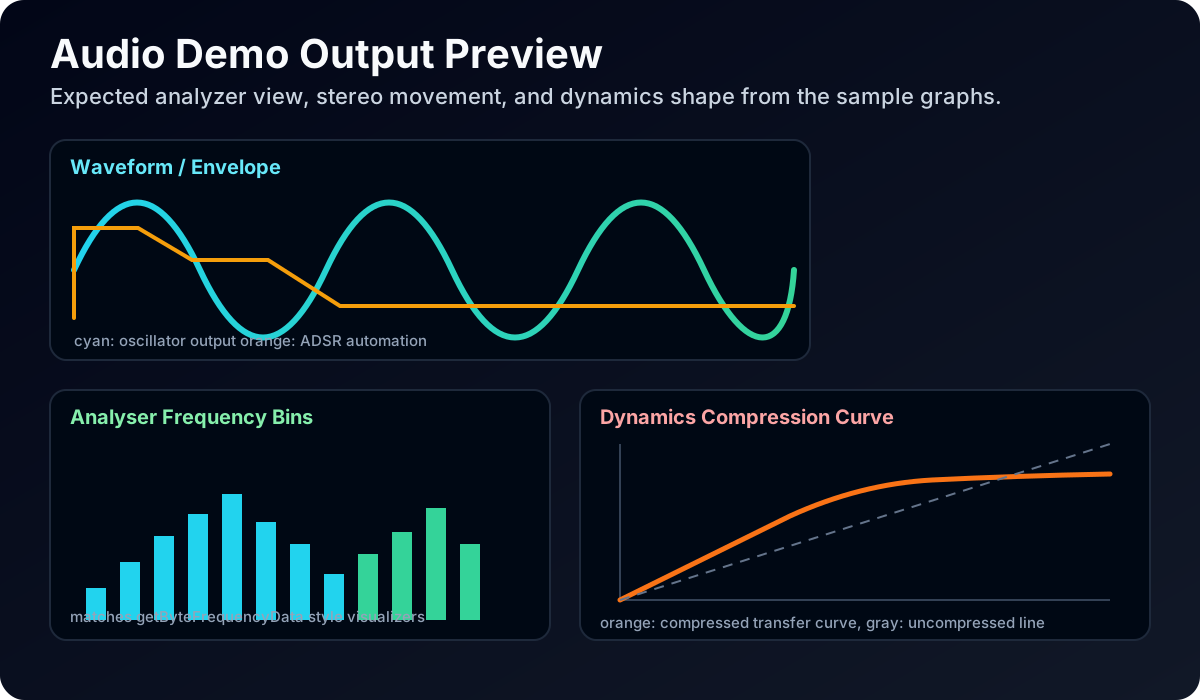
Focus on the compression transfer-curve panel in the preview image: as threshold decreases and ratio increases, output level growth should flatten compared to dry signal.
1. Basic compressor chain
ts
import { AudioContext } from '@nativescript/audio-context';

const ctx = new AudioContext();
await ctx.resume();

const source = ctx.createBufferSource();
source.buffer = await ctx.decodeAudioData('~/assets/audio/voice.wav');

const compressor = ctx.createDynamicsCompressor({
  threshold: -24,
  knee: 30,
  ratio: 3,
  attack: 0.003,
  release: 0.25,
});

source.connect(compressor);
compressor.connect(ctx.destination);
source.start();
2. Parallel compression (dry/wet)
ts
import { AudioContext } from '@nativescript/audio-context';

const ctx = new AudioContext();
await ctx.resume();

const source = ctx.createBufferSource();
source.buffer = await ctx.decodeAudioData('~/assets/audio/drums.wav');

const compressor = ctx.createDynamicsCompressor({ threshold: -28, ratio: 8 });

const dry = ctx.createGain({ gain: 0.7 });
const wet = ctx.createGain({ gain: 0.35 });

source.connect(dry);
source.connect(compressor);
compressor.connect(wet);

dry.connect(ctx.destination);
wet.connect(ctx.destination);

source.start();
3. Live tweak compressor parameters
ts
import { AudioContext } from '@nativescript/audio-context';

const ctx = new AudioContext();
await ctx.resume();

const oscillator = ctx.createOscillator({ type: 'sawtooth', frequency: 160 });
const compressor = ctx.createDynamicsCompressor();
const gain = ctx.createGain({ gain: 0.08 });

oscillator.connect(compressor);
compressor.connect(gain);
gain.connect(ctx.destination);

compressor.threshold.value = -30;
compressor.ratio.value = 4;
compressor.attack.value = 0.01;
compressor.release.value = 0.2;

oscillator.start();

setTimeout(() => {
  console.log('reduction', compressor.reduction.value);
  oscillator.stop();
}, 1000);
4. Compression plus EQ chain
ts
import { AudioContext } from '@nativescript/audio-context';

const ctx = new AudioContext();
await ctx.resume();

const source = ctx.createBufferSource();
source.buffer = await ctx.decodeAudioData('~/assets/audio/music.wav');

const eq = ctx.createBiquadFilter({ type: 'peaking', frequency: 2500, Q: 1.2, gain: 2.5 });
const compressor = ctx.createDynamicsCompressor({ threshold: -20, ratio: 2.5 });

source.connect(eq);
eq.connect(compressor);
compressor.connect(ctx.destination);

source.start();
Notes
threshold,knee,ratio,attack, andreleaseare AudioParam-backed.- You can automate compressor parameters with standard AudioParam scheduling methods.
reductioncan be read for metering-style diagnostics.